Imagine Weave: Explore Multiple AI Image Models in One Creative Workspace
Discover how Imagine Weave brings OpenAI, Google, and Black Forest Labs AI image models together—text to image, image to image, and flexible creative workflows in one place.
 Imagine Weave
AI image generation is changing the way people create digital content. From professional designers and marketers to social media creators and everyday users, more people are discovering how artificial intelligence can turn simple text prompts into impressive visual content.
Imagine Weave brings multiple AI image-generation models together in one creative workspace, making it easier to explore different approaches to image creation without constantly switching between separate platforms.
One platform, multiple AI models
One of Imagine Weave’s most interesting features is its selection of AI image models. The platform brings together technologies from providers such as OpenAI, Google, and Black Forest Labs.
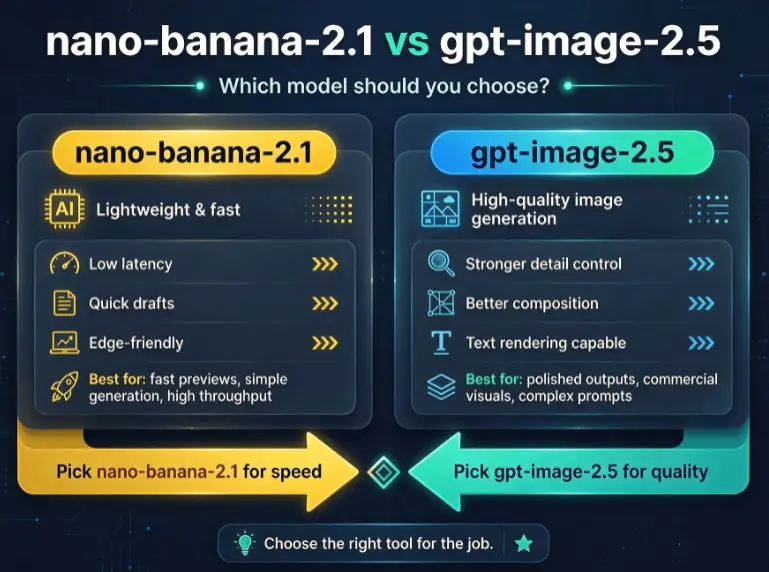
Depending on the available model options, users can explore GPT Image, Nano Banana, and FLUX models to create different kinds of visual content. This gives creators more flexibility when choosing an image-generation approach for their projects.
Want a practical walkthrough? See How to use Imagine Weave or compare families in AI image models on Imagine Weave.
Turn ideas into images
With text to image generation, users can describe what they want to see and let AI transform their ideas into visual results.
For example, you can create:
- Cinematic portraits and professional photography
- Fantasy landscapes and imaginative artwork
- Marketing images and advertising concepts
- Product photography and e-commerce visuals
- Anime characters and digital illustrations
- Social media graphics and blog images
You don’t need to be a professional designer to start experimenting with AI-generated images. Open the Text to Image workspace, pick a model, write a short prompt, and generate.
Transform existing photos
Imagine Weave also supports image to image generation. Instead of starting from scratch, users can upload a reference image and explore new creative directions.
This is particularly useful for people who want to experiment with different visual styles or transform existing photographs—restyle a product shot, shift a portrait’s lighting, or remix a scene while keeping the parts you like.
Who should try Imagine Weave?
The platform is worth exploring for:
- Content creators looking for fresh visual ideas
- Online sellers who need product images
- Digital marketers creating advertising materials
- Bloggers who need original illustrations
- Designers experimenting with different AI models
Credits and plans are listed on Pricing. Model-specific tips live in the Nano Banana 2.1 guide and GPT Image 2.5 guide.
Final thoughts
If you are interested in AI image generation and want to explore multiple image models in one place, Imagine Weave is worth checking out.
Instead of treating every AI model as a separate destination, it offers a workspace for exploring different image-generation possibilities—text to image, image to image, and side-by-side model tests in the same flow.